FAQ
About BOX.GAME
Q1. Why can't I open BOX.GAME? /Which browser can I use to open BOX.GAME?
Please use Google Chrome browser to open BOX.GAME.
Download Chrome:http://down.codemao.cn/chrome/download/googlechrome.exe
Please note: after downloaded Chrome, do not forget to update it to the latest version.
Q2. Can I open BOX.GAME on computer with Windows XP?
BOX.GAME is not available on computer with Windows XP. You can use computer with Windows 7 and above versions (Windows 8, Windows 10), or Mac.
Q3. Why is BOX.GAME not shown normally (including fail to load coding blocks, cannot operate in game, fail to show skybox, etc.)?
Please make sure you open BOX.GAME in Chrome (computer terminal) or in BOX.GAME app (mobile terminal), and update them to latest version. Using other browsers or tools may lead to problems like operation failure. Download link: please see Q1.
Q4. What is the difference between BOX.GAME and Minecraft?
With BOX.GAME, you can establish your world by using its graphical coding language, and save your building or game to local. What's more, project created in BOX.GAME is shareable.
About Operation
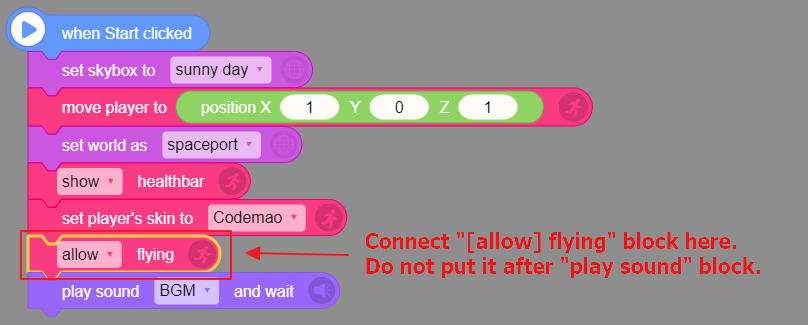
Q5. How to enable flying?
You need to use "[allow] flying" block in coding area. Then you can double-press space bar to start flying and double-press again to stop. When the sprite is flying, you can keep pressing space bar to ascend and Shift key to descend.
Q6. Why can't I open my backpack?
Check if blocks below are in coding area. If not, drag them into coding area and start the game again. Then you can press key E to open or close backpack.

Others
Q7. Why are some blocks in open courses missing in BOX.GAME Editor?
BOX.GAME is developing continuously. Some blocks may be deleted or changed. Please refer to the latest version.
Q8. Can I search or locate a certain block?
This function is not yet available. Trainee can clean up blocks by himself/herself to form a habit of cleaning up codes. We will add this function in the following version.