Sound
1. play sound [break]

Play the selected sound and once played, run the script below immediately.
How to add sounds?
2. play sound [break] and wait

Play the selected sound and run the script below until the sound ends.
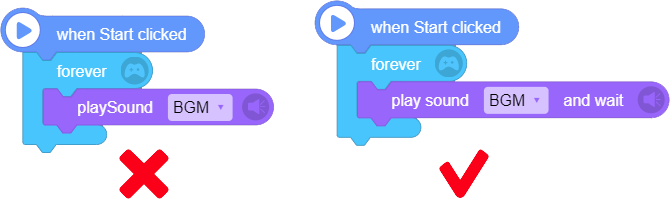
Please note: if you want to repeat the background music, do not use "play sound [ ]" block with "forever" block, which will cause multiple sounds played at the same time. You should use "play sound [ ] till end" block with "forever" block.
3. play note [A0] for [1] beats

Play the selected [note] for [input value] beats. For example, C5 refers to middle C.
Click the drop-down list to select note by clicking the key.

4. wait for [1] beats

Stop playing for the specified number of beats.
Please note: wait for 1 beat ≠ wait for 1 second
5. stop all sounds

Stop all the playing sounds, including notes.
Tip: how to switch the background music
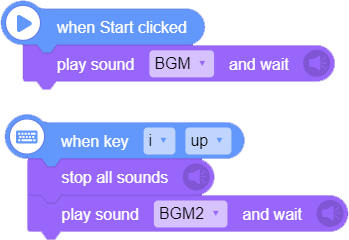
If you have used "play sound [ ] till end" block, but you want to switch to another sound, like the background music, then you can use "stop all sounds" block to stop all the playing sounds before playing another background music.
6. say [Hello!]

- Read the sentence you enter, and once read, run the script below immediately . Chinese and English are supported.
7. say [Hello!] and wait

Read the sentence you enter until it is finished before running the script below. Chinese and English are supported.
Please note: [say "the text you enter"] blocks can be run at the same time. If you use several [say "the text you enter"] blocks and the sentences you enter are too long, the next sentence will be played before the last sentence is finished, which will cause an overlap of playing sentences. So, if you want to play the sentences in order, please use [play "the text you enter" till end] block.