Data
1. debug [0]

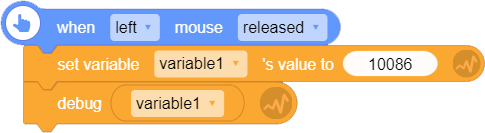
When you run this block, the debug content will be shown on the top left. This block is often used to check variables and values in lists. As in BOX.GAME, you cannot see the current value of variables, so this block is very useful.
Please note: this block only works when you are editing the project. Once published, this block does not work any more.
For example: debug and show the value of a variable when left mouse is released.

2. [variable]

Variable is a symbolic name associated with a value and whose associated value may be changed. We need to give the variable a specific name to identify it.
Please note: in BOX.GAME, the original value of an unassigned variable is 0 (value type).
How to create a new variable?
3. set variable [ ]'s value to [0]

- Assign a variable means to set the variable's value. Usually, the default data type of a variable is value type, but string type and array type are also supported.
4. increase variable [?] by [1]

- Increase a certain variable by the value you enter.
5. list

List, or linked list, is a container of many variables. You can change, add, delete or get the value of each variable in the list.
List, like a snake, has many "joints". Each joint contains a data;
| No. 1 | No. 2 | No. 3 | No. 4 | No. 5 | ...... |
|---|---|---|---|---|---|
Please note: before you add any item, the list will be empty, i.e, the list contains 0 item.
How to create a new list?
6. append [0] to the last of [list]

Append an item (any type; the default data type is value) to the last of a list; the appended item will be the last item of the list.
For example: after running this block, a 5-item list will now have 6 items, and the 6th item is the item you added just now.
For example:
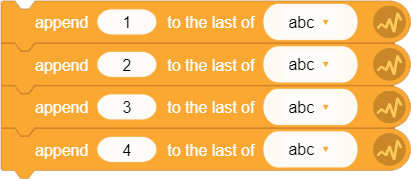
After running the script above, list abc has 4 items, and each item is:
| Item | No. 1 | No. 2 | No. 3 | No. 4 |
|---|---|---|---|---|
| Data | 1 | 2 | 3 | 4 |
7. insert [0] at [list] No. [1]

Insert an item (any type; the default type is value) at a specified index of a list.
Please note: "insert" means to add a new item to the list rather than replace a certain item with the new item. After running this block, the items after the specified item will be pushed back by one item, and the total number of items in the list will be increased by one.
For example:
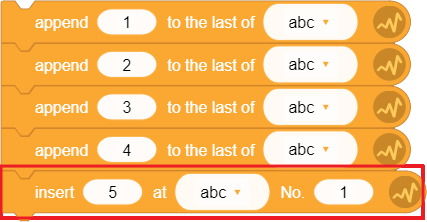
Add a "insert [5] at [abc] No. [1]" block to the script in the last example. Run the script, and the total number of items in this list will be increased by 1, and each item will be:
| Item | No. 1 | No. 2 | No. 3 | No. 4 | No. 5 |
|---|---|---|---|---|---|
| Data | 5 | 1 | 2 | 3 | 4 |
8. delete [list] No. [1] item

Delete a specified item in a list. Items after this specified item will be moved forward by one item, and the total number of items in this list will be decreased by one.
For example:
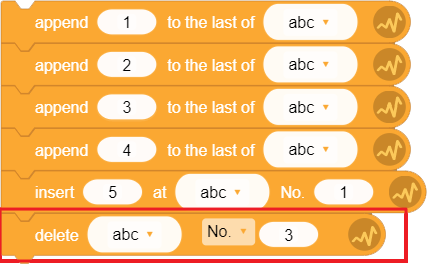
After running the script above, the total number of items in list abc will be:
| Item | No. 1 | No. 2 | No. 3 | No. 4 |
|---|---|---|---|---|
| Data | 5 | 1 | 3 | 4 |
9. replace [list] No. [1] item with [0]

Replace a certain item in the list with other item. This block will not change the sum of items of the list.
For example:
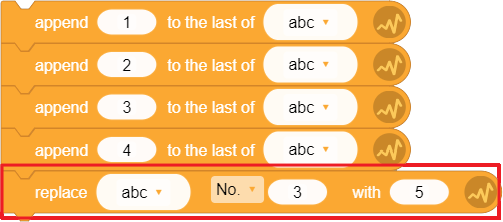
After running the script above, the items of list abc will be:
| Item | No. 1 | No. 2 | No. 3 | No. 4 |
|---|---|---|---|---|
| Data | 1 | 2 | 5 | 4 |
10. [list] No. [1]

- This block is usually used to get a specified item of a list. It is like a "variable" put at a certain index of the list.
11. length of [list]

- Get the length, or the sum of items, of a specified list.
12. [list] contains [0]?

- If the list contains the data you entered, then the condition is true.